Posts

ReactJs Top Hooks List

 In today article we are going to show you some reactjs hooks which can help you to increase your reactjs knowledge.  What is hooks? Hooks are a new addition in React 16.8.  It allows you to use state and other React features without writing a class. Hooks are the functions which "hook into" React state and lifecycle features from function components. Following are some hooks which are most useful for you 1. useState Hook  React useState() is a built in hooks or function which comes with React library. When you want to use “useState” you need to first import in your application using following code sample.  useState() only work with functional components. This will not work with Class components in React. Visit original article here 2. useEffect Hook The useEffect() hook allows us to run side effects on your functional components. Side effects is a general concept about how functions behave which are not predictable. A function is supposed to have side effe...

Latest CodeIgniter interview questions and answers

Image
  Are you looking jobs in CodeIgniter? Then you are at the right place. We provide you with the best CodeIgniter interview Question and Answers in this article blog. CodeIgniter is an open-source software rapid development web framework, for use in building dynamic web sites with PHP. CodeIgniter is loosely based on the popular model-view-controller (MVC) development pattern. There are numerous leading companies that offer lots of job positions in CodeIgniter like PHP Developer with CodeIgniter Frame work, Senior PHP Developer, Backend Developer CodeIgniter etc. Q1. Explain Codeigniter Architecture? CodeIgniter is designed to deliver maximum performance in less time within a clean environment. To achieve this, each developing process is designed in a simplified way. From technical point of view it is dynamically instantiation (libraries are loaded on request which makes it light-weighted), loose coupling. (components rely very less on each other) and component singularity (each cla...

Function Overloading And Overriding In PHP

Image
  Function overloading and overriding is the Object Oriented Programming feature in PHP. Function overloading means multiple function have the same name but different parameters. But in case of function overriding, more than one functions will have same method signature and number of arguments. PHP doesn’t support function overloading directly like other languages such as C++, JAVA etc. But we can overcome this issue with using the PHP magic method __call(). So let’s see how overloading and overriding in PHP works. Function Overloading In PHP Function overloading contains same function name and that function performs different task according to number of arguments. Example <?php class Shape { const PI = 3.142 ; function __call($name,$arg){ if($name == 'area') switch(count($arg)){ case 0 : return 0 ; case 1 : return self::PI * $arg[0] ; case 2 : return $arg[0] * $arg[1]; } } ...

The Requested Url /Phpmyadmin/ Was Not Found On This Server

Image
  What Is phpMyAdmin phpMyAdmin is an open-source software tool introduced on September 9, 1998, which is written in PHP. Basically, it is a third-party tool to manage the tables and data inside the database. phpMyAdmin supports various type of operations on MariaDB and MySQL. The main purpose of phpMyAdmin is to handle the administration of MySQL over the web. phpMyAdmin has a GUI application which used to mange the database. Here we can create a database, table and execution of mysql query using phpMyAdmin GUI Our Problem  : phpMyAdmin url not found. Here you will find the  Solution Here

The difference between React vs AngularJs

Image
React and AngularJs are currently using Travel and News companies. Main reason difference between AngularJs and ReactJs is AngularJS 1. AngularJs is MVC framework library. It is used for Two-way data binding. 2. AngularJs is an App development framework. ReactJS 1. React Js is a Library. It is used for One-way data binding. 2. ReactJs is an interface development framework. AngualrJs is a Javascript Framework. Where we can add HTML tags with Scrip tag. It is a Library written in Javascript. AngularJs developed by GOOGLE. AngularJs similar to Backbone or JavascriptMVC. It is a complete solution for rapid development. Following are some Features of AngularJs. 1. REST Easy: RESTful action quick communication between server to the client. 2. Extends HTML: AngularJS extends HTML with ng-directives. The ng-app directive defines an AngularJS application. The ng-model directive binds the value of HTML controls (input, select, textarea) to application data. The ng-bi...

What is difference between get and post method in php

What is HTTP? The Hypertext Transfer Protocol (HTTP) is designed to enable communications between clients and servers. HTTP works as a request-response protocol between a client and server. Two HTTP Request Methods commonly used for request-response between a client and server: GET and POST The GET Method Following example which shows you how to use get method. http://www.example.com/test/demo_form.php?name1=value1&name2=value2 Following are GET Request Method Points. 1. Request can be cached 2. Requests can be bookmarked 3. Requests remain in the browser history 4. Requests have length restrictions 5. Requests should be used only to retrieve data 6. Requests should never be used when dealing with sensitive data 7. Maximum path length of 2,048 characters 8. Data visible to everyone in URL. 9. GET is less secure compared to POST because data sent is the URL. Following are POST Request Method Points. 1. Requests are never cached 2. Requests do not remain in...

Connect to Amazon EC2 instance using Filezilla and SFTP

Image
Hello friends this tutorial help you how to connect AWS EC2 instance using Filezilla and SFTP. First you need to have .pem file. This .pem file is created when you are creating a new instance in your AWS account. Follow below steps to connect AWS EC2 instance. 1. Start Filezilla. Goto preference ->connection->SFTP 2. Add .pem file then you will get prompt to convert .pem file. 3. Save with same name. 4. Add Host address. You will get public ip from AWS EC2 instance. 5. Username ec-2 or ubuntu. Username you will find in connect tab. 6. Port : 22 7. Connect. 8. Finish.

Magento – Newsletter's emails stuck in Queue

Image
If you are scratching your head to figure out why not Magento sending newsletter email. Here we got the same problem. You can check on Problem with Solution. Problem We installed newsletter pop up extension which was working fine. But after some days we saw newsletter emails are not working. We tried many solutions, Check Magento newsletter setting and also check cronjob code. But no luck. Then we have tried to uninstall recently installed extensions on the server then we found MailChimp and Newsletter POP extension are conflicting with each other. If you have a facing same problem then you can apply the following solution 1. First, check cronjob properly set or not. sudo crontab -e */5 * * * * /path/to/php -f /path/to/cron.php  2. This solution we found on ebizmarts forum. Comment out line 118 of app/code/community/Ebizmarts/MailChimp/Model/Observer.php //$subscriber->setImportMode(true); //commented out to enable Magento to send emails In app/code/comm...

Free AWS EC2 Ubuntu Instance Website setup

Image
Amazon Web Service is a cloud platform which given us to create free hosting in both platform like Windows and Linux. Here we are working on Ubuntu setup. Where we will install Apache2, PHP and MySQL. 1. First you have to create new account in AWS. If you have existing account then no need to create. 2. After login you have to select EC2 option then you enter EC2 Dashboard. 3. Click Launch Instance 4. Select Free tier Eligible Ubuntu option. 5. Add New Volume EBS. 6. Add New Tag. 7. Add Security Group.   Type : SSH   Protocol: TCP   Port : 22   Source : Anywhere   Type : HTTP   Protocol : TCP   Port : 80   Source : Anywhere 8. Review and Launch 9. Create a New Pair Key. Download Key. 10. Using Puttygen.exe software create public and private key. 11. Login SSH using putty.exe Now we are ready to install Apache2, PHP, MySQL. Command 1 ( Update Ubuntu server ) sudo apt-get update sudo apt-get dist-upgrade ...

Login SSH using Putty.exe

Image
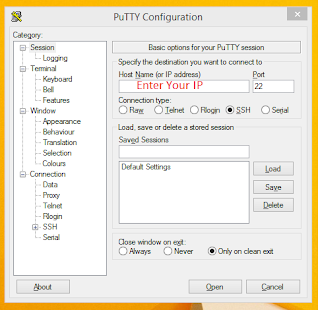
Login SSH using Putty.exe Putty is an SSH and Telnet client software, developed by Simon Tatham for the Windows platform. Putty is open source software Follow below steps which can help you to login SSH using putty. 1. Download Putty.exe 2. Enter IP. 3. Select PPK file path provide by your hosting provider or if you are using AWS then you will get ppk file from there also.

How to clear the cache of client browsers?

Image
Hello friends today we will learn how to clear the cache client browsers. This technique is very simple. Just add a version parameter to the URL string which is either a random string or a random number. If you change your sites CSS and upload on the server you will get old result only. For solve this problem, simply add ?ver=1.1 to the CSS import at the head of the file. So the browser teat as a different file. Example: <link href="css/style.css" rel="stylesheet" type="text/css" /> Becomes <link href="css/style.css?ver=1.1" rel="stylesheet" type="text/css" /> Same you can apply for JavaScript files.

How to send emails using PHPmailer and GMAIL SMTP

Image
Here I have tried how to send PHPMailer with attachement using SMTP configuration. For SMTP Configuration we here used GMAIL Auth. You can used any Auth like SMTP2GO , SendGrid . Download PHPMailer library. PHPMailer Sample Code Addd or Copy paste the following code in your editor and save with any filename with extension ".php" and try in your live server or local server. But Make sure you have to connect with internet with proper Auth details <?php require_once('phpmailer/PHPMailerAutoload.php'); $mail = new PHPMailer(); $mail->CharSet = "utf-8"; $mail->IsSMTP(); // Set mailer to use SMTP $mail->SMTPDebug = 1; // Enable verbose debug output $mail->SMTPAuth = true; // Enable SMTP authentication $mail->Username = "xxx@example.com"; //Your Auth Email ID $mail->Password = "xxxxxx"; //Your Password $mail->SMTPSecure = 'tls'; // Enable TLS encryption, `ssl` also accepted $mail->Host = "...

How to use SytaxHighlighter code with Blogger

# Add Sytax Highlighter to your Blogger Code Samples After trying many solutions to implement syntax highlighting on Blogger, I came across [Alex Gorbatchev's](http://alexgorbatchev.com/SyntaxHighlighter/) Javascript plugin. Implementing it is very easy, however, I couldn't get it to work on secure (https) URLs. Add the below code in your `head` tag. http://alexgorbatchev.com/pub/sh/current/scripts/shCore.js http://alexgorbatchev.com/pub/sh/current/scripts/shBrushBash.js http://alexgorbatchev.com/pub/sh/current/scripts/shBrushCpp.js http://alexgorbatchev.com/pub/sh/current/scripts/shBrushCSharp.js http://alexgorbatchev.com/pub/sh/current/scripts/shBrushCss.js http://alexgorbatchev.com/pub/sh/current/scripts/shBrushDiff.js http://alexgorbatchev.com/pub/sh/current/scripts/shBrushJava.js http://alexgorbatchev.com/pub/sh/current/scripts/shBrushJavaFX.js http://alexgorbatchev.com/pub/sh/current/scripts/shBrushJScript.js http://alexgorbatchev.com/pub/sh/current/scripts/shB...

Select active menu using jquery

Most of the developer has an issue to select active menu in the same header. So here we try with the following example. May be this example will help you, If you have any doubt or question you can comment us. We will reply you ASAP. Home About us Contact us >/li> Suppos here we click on Home menu. Then home li should be selected. My URL is : http://www.example.com/home Output : Home About us Contact us >/li>

Import CSV to Database using PHP

Import csv database using PHP. Follow the following code and you will done with CSV import script using PHP. If you have any questions you can feel free comment we will reply you ASAP. PHP Code <?php if(isset($_POST["Import"])) { $filename=$_FILES["file"]["tmp_name"]; if($_FILES["file"]["size"] > 0) { $file = fopen($filename, "r"); mysql_query('truncate table table'); while (($data = fgetcsv($file, 10000, ",")) !== FALSE) { $sql = "INSERT into table(name,email,avg,sr,runs,wickets,hs,sixes,fours,longsixes,created) values('$data[0]','$data[1]','$data[2]','$data[3]','$data[4]','$data[5]','$data[6]','$data[7]','$data[8]','$data[9]', now())"; mysql_query($sql); } fclose($file); echo ...

WP Migrate DB

Image
Friends used WP Migrate DB plugin. Which is very easy to migrate your database from one server to another without any loss information. Trust me I have used this plugin in many website. WP Migrate DB exports your database as a MySQL data dump (much like phpMyAdmin), does a find and replace on URLs and file paths, handles serialized data, then allows you to save it to your computer as an SQL file. To complete the migration, you need to use a database management tool (e.g. phpMyAdmin) to import the SQL file to your database, replacing your existing database. It is perfect for developers who need to migrate fresh data from the production site to their local install, or migrate their locally developed site to a staging or production server. Check Link Click Here

Enabling Gzip Compression of PHP, CSS, and JS Files Without mod_deflate

For enable Gzip compression using mod_deflate add following lines to your .htaccess file AddOutputFilterByType DEFLATE text/html text/plain text/xml text/css text/javascript application/javascript application/x-javascript But those who don’t allow the mod_deflate module and run PHP in CGI/FastCGI mode you can’t go with the easy method. So, to serve up your PHP, CSS, and JS files you can try the following method. Step 1: PHP Configuration Add or modify the following lines in your custom php.ini file output_handler = Off zlib.output_compression = On zlib.output_handler = ob_gzhandler Now this will take care of gzipping all PHP files. Step 2: .htaccess Configuration Add the following lines to the bottom of a .htaccess file in the root of your website. RewriteEngine On RewriteRule ^(.*\.js) gzip.php?type=js&file=$1 RewriteRule ^(.*\.css) gzip.php?type=css&file=$1 This will redirect all css and js requests files through gzip.p...

How to check UBUNTU version?

When I was learning Ubuntu it was very difficult to know Ubuntu version. Refer following step which can help you to know Ubuntu version. Step 1: Open the terminal. Step 2: Enter the lsb_release -a command. Step 1: Open “System Settings” from the desktop main menu in Unity. Step 2: Click on the “Details” icon under “System.” Step 3: See version information. Or Use this in the terminal to show the details about the installed Ubuntu "version": lsb_release -a

How to work code-igniter project in sub-folder

When this happens when you have 2 .htaccess files in the server. Very simple solutions just add following code and your code-igniter project will work in sub-folder. RewriteEngine on RewriteCond $1 !^(index\.php|images|robots\.txt) RewriteCond %{REQUEST_FILENAME} !-f RewriteCond %{REQUEST_FILENAME} !-d RewriteRule ^(.*)$ /admin/index.php?/$1 [L]

CodeIgniter Subfolder .htaccess setup

When you are going to setup  CodeIgniter in live sufolder. There you need to create .htaccess file. RewriteEngine on RewriteCond $1 !^(index\.php|images|robots\.txt) RewriteCond %{REQUEST_FILENAME} !-f RewriteCond %{REQUEST_FILENAME} !-d RewriteRule ^(.*)$ /admin/index.php?/$1 [L]